As of 2026-11-06, first draft (racial keys updated). Forever build 1.60.1.70790. Nothing below was checked in game.
Druid hotkeys by spec: Balance, Feral, Restoration
The idea
- Movement: WASD, with A and D strafing and the mouse turning. Shift-W/A/S/D stay unbound, so holding Shift never stops you moving. WERD and QWES versions of every chart are further down.
- One key, one job in every form. Action Bar 1 swaps to a different page in each form:
- Q is your main hit: Wrath, Claw in Cat, Primal Bite or Maul in Bear.
- E is a damage-over-time or area spell: Moonfire, Rake, Swipe.
- F is the finisher: Ferocious Bite in Cat, Bash in Bear, Insect Swarm in Moonkin.
- Forms are on 3, 4, 5 and 6 (Bear, Cat, Travel, Moonkin), with Aquatic on Shift-5. They sit on Action Bar 5, which never changes page, so you can switch from any form.
- Layers: Shift for crowd control and utility, Ctrl for rare tools, and Alt for emergencies. Alt-1 to Alt-4 are buffs.
- Racials: Alt-Q is your race's combat racial and Ctrl-Z its utility racial (table below).
- Pictures:
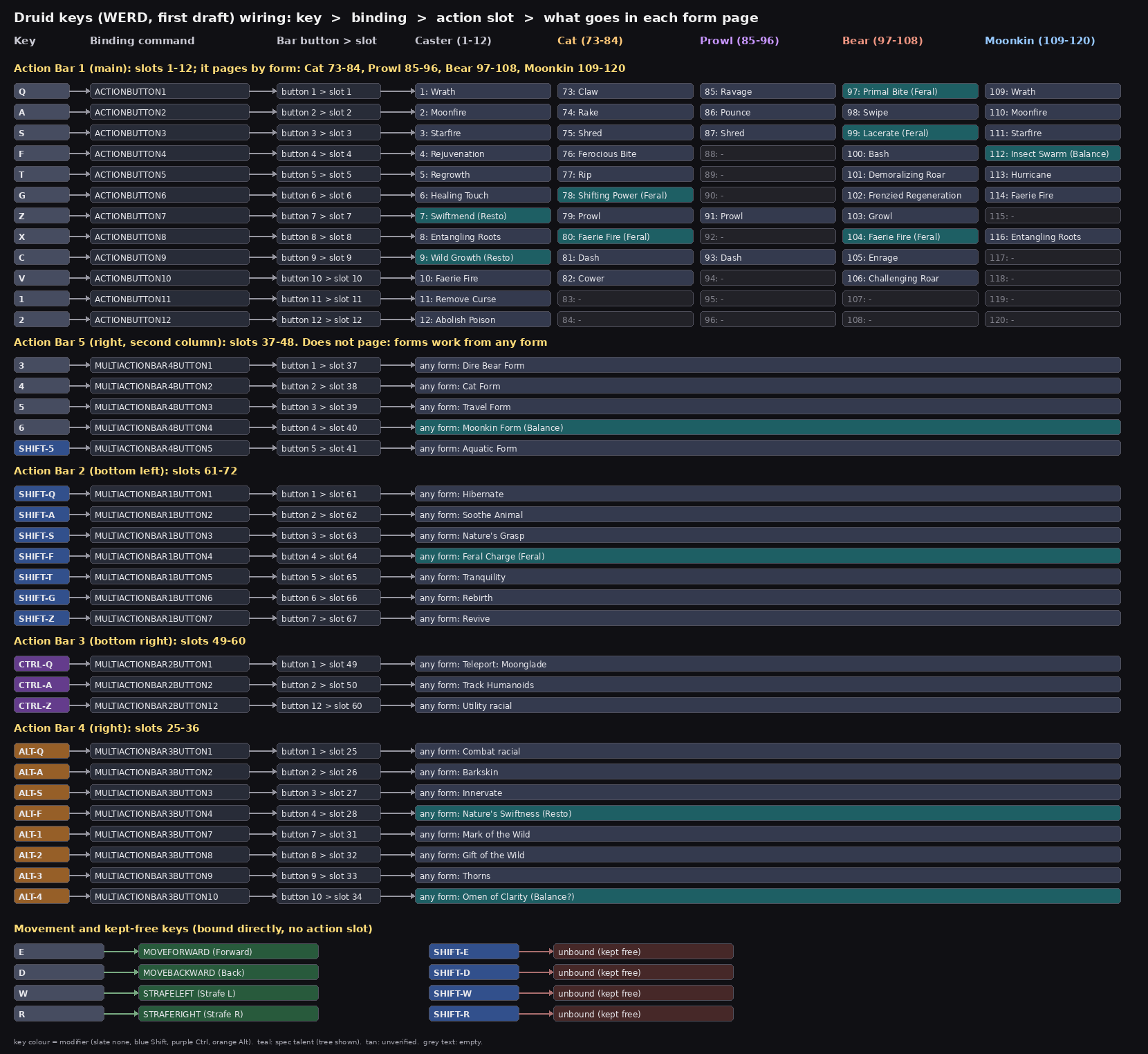
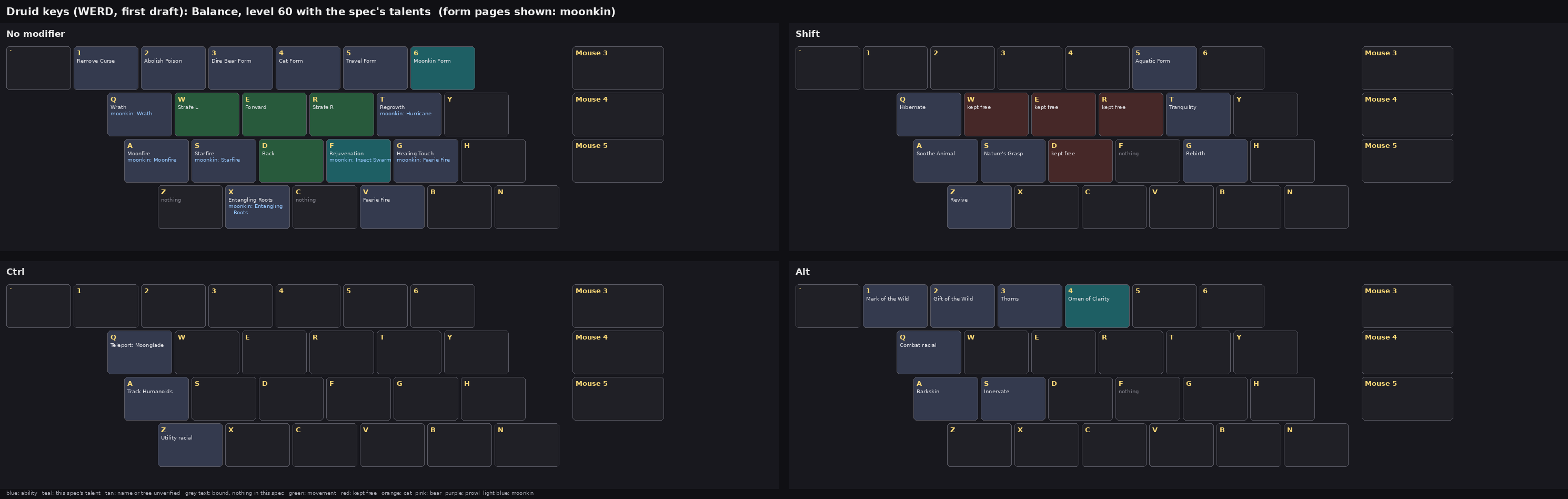
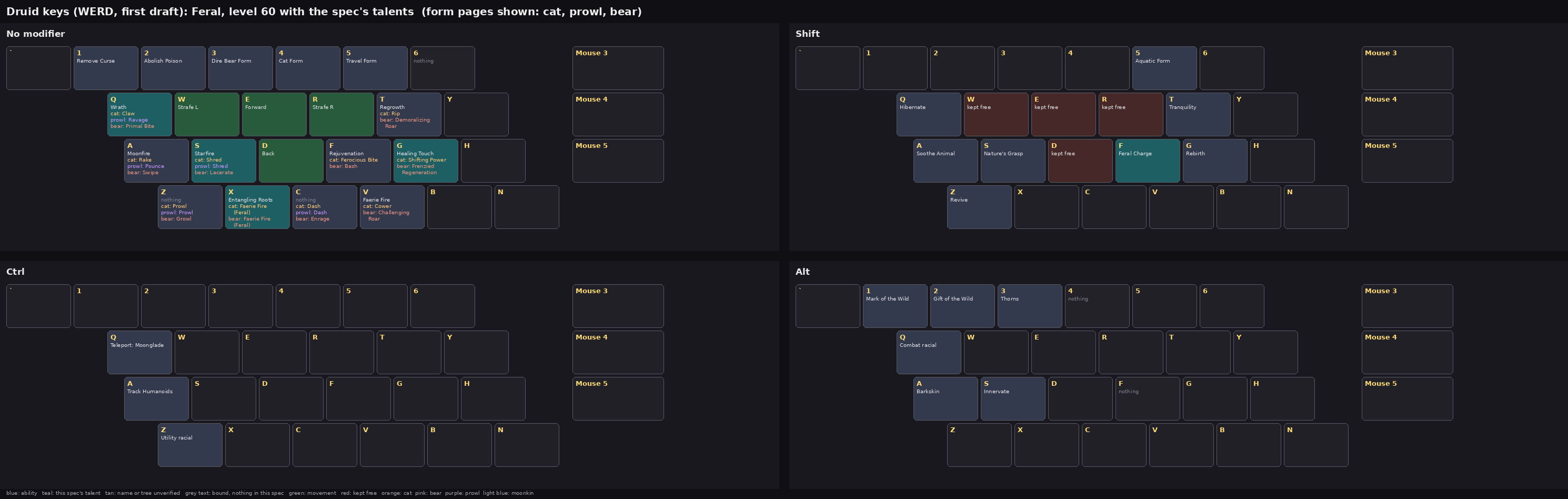
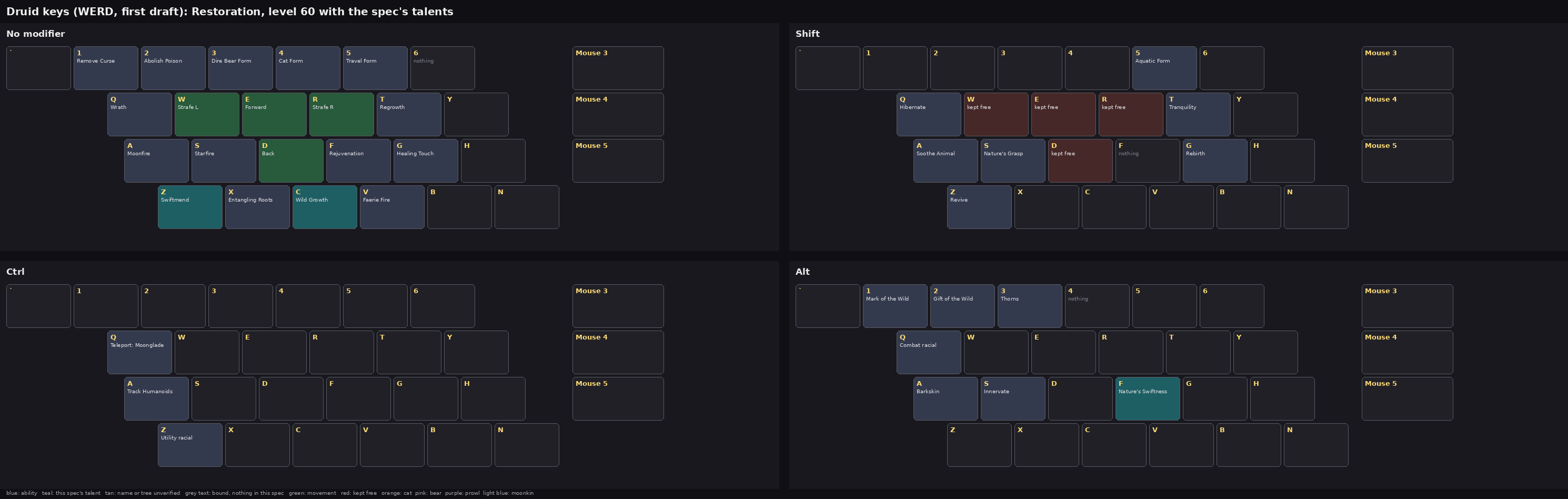
druid-keys-balance.png,druid-keys-feral.pnganddruid-keys-restoration.png: the keyboard per spec at level 60, with the form pages that spec uses.druid-wiring.png: each key, its binding command, the action slot, and what goes in every form page.
Setting it up by hand
- Turn on the bars: Settings > Gameplay > Action Bars: turn on Action Bars 2, 3, 4 and 5. A hidden bar's buttons don't respond to keys.
- Movement: Key Bindings > Movement:
- Bind your scheme's four keys (Movement schemes, below).
- Unbind Turn Left and Turn Right; the mouse turns.
- Bind each key to the button the wiring diagram names:
- ACTIONBUTTON is Action Bar 1.
- MULTIACTIONBAR1BUTTON is Action Bar 2, MULTIACTIONBAR2BUTTON is Action Bar 3, MULTIACTIONBAR3BUTTON is Action Bar 4 and MULTIACTIONBAR4BUTTON is Action Bar 5.
- Fill the bars:
- Drag each spell onto its button.
- In Forever, new spells and ranks no longer go onto your bars by themselves. Drag each one on when you learn it.
- For the form pages, shift into the form first. For Prowl, go into Cat Form and then Prowl.
- The first time you shift, Action Bar 1 should go blank. Drag that column's spells onto it.
- If the bar still shows your caster spells, that form has no page of its own on this client. Skip that column, or you'll overwrite your caster spells.
- Default keys you lose: binding a key replaces its default job. C no longer opens the Character pane; open it from the menu bar, or bind Toggle Character Pane to Shift-C.
Action Bar 1, by form
| Key | Caster | Cat | Prowl | Bear | Moonkin |
|---|---|---|---|---|---|
| Q | Wrath | Claw | Ravage | Primal Bite / Maul | Wrath |
| E | Moonfire | Rake | Pounce | Swipe | Moonfire |
| R | Starfire | Shred | Shred | Lacerate / Maul | Starfire |
| F | Rejuvenation | Ferocious Bite | Bash | Insect Swarm | |
| T | Regrowth | Rip | Demoralizing Roar | Hurricane | |
| G | Healing Touch | Shifting Power | Frenzied Regeneration | Faerie Fire | |
| Z | Swiftmend | Prowl | Prowl | Growl | |
| X | Entangling Roots | Faerie Fire (Feral) | Faerie Fire (Feral) | Entangling Roots | |
| C | Wild Growth | Dash | Dash | Enrage | |
| V | Faerie Fire | Cower | Challenging Roar | ||
| 1 | Remove Curse | ||||
| 2 | Abolish / Cure Poison |
A "/" means the first spell you have: Primal Bite once you take the talent, Maul until then. Primal Bite is on the Bear page only. The notes call it the Bear-focused talent; if it turns out to work in Cat Form, put it on Cat Q in place of Claw.
Other bars
| Layer | Keys |
|---|---|
| Forms (Action Bar 5) | 3 Dire Bear / Bear Form, 4 Cat Form, 5 Travel Form, 6 Moonkin Form, Shift-5 Aquatic Form |
| Shift (Action Bar 2) | Q Hibernate, E Soothe Animal, R Nature's Grasp, F Feral Charge, T Tranquility, G Rebirth, Z Revive |
| Ctrl (Action Bar 3) | Q Teleport: Moonglade, E Track Humanoids, Z utility racial |
| Alt (Action Bar 4) | Q combat racial, E Barkskin, R Innervate, F Nature's Swiftness, 1 Mark of the Wild, 2 Gift of the Wild, 3 Thorns, 4 Omen of Clarity |
Racials by race
Druids in Forever can be Tauren, Night Elf, or either Skyborne race (Windshaper on the Horde, High Order on the Alliance). Every race now has two active racials.
| Race | Alt-Q (combat) | Ctrl-Z (utility) |
|---|---|---|
| Tauren | War Stomp: 2 s stun, 90 s cooldown | Cultivation |
| Night Elf | Elune's Light: +10% crit for 15 s | Shadowmeld |
| Windshaper Skyborne | Skysight: +15% run speed for 15 s | Walk on Air: glide for 10 s |
| High Order Skyborne | Read Leyline: +50% Health and Mana regeneration for 15 s | Walk on Air |
Read Leyline can't be used while Innervate is active.
What changes by spec
| Key | Balance | Feral | Restoration |
|---|---|---|---|
| 6 | Moonkin Form | (empty) | (empty) |
| Moonkin page | used | - | - |
| Cat, Prowl and Bear pages | - | used | - |
| Bear Q / R | Maul | Primal Bite, Lacerate | Maul |
| Cat G | (empty) | Shifting Power | (empty) |
| Shift-F | (empty) | Feral Charge | (empty) |
| Z, C (caster) | (empty) | (empty) | Swiftmend, Wild Growth |
| Alt-F | (empty) | (empty) | Nature's Swiftness |
| Alt-4 | Omen of Clarity (?) | (empty) | (empty) |
Every spec still uses the caster page for heals, buffs and roots.
Forever changes that shaped this
From Blizzard's beta development notes (October updates and the Nov 2 update):
- Feral:
- Mangle is renamed Primal Bite, now a Feral talent in row 7.
- Shifting Power is a new Cat-only Feral talent: mana into 40 Energy, 16 s cooldown.
- Lacerate is now a Feral talent in row 4.
- Tiger's Fury and Berserk are removed.
- Restoration:
- Wild Growth is in Restoration and has a 3 s cast.
- Swiftmend now needs your own Rejuvenation or Regrowth on the target.
- Balance: Moonkin Form and Insect Swarm are Balance talents.
- New ranks and levels: a new Ferocious Bite rank 1 at level 24, Shred rank 1 at 20, and Poised (a passive Energy discount) at 32.
- Bears: Bear Form threat is up to 115%.
Sources
- Blizzard "Beta Development Notes - Updated November 2", captured 2026-11-04. It includes the October updates.
- ForeverAuras 1.2.2
SecretAuraRanks.lua(beta data, read 2026-11-05) names the druid spells. - RXPGuides 4.11.32 names Revive and Faerie Fire (Feral).
- Racials: the racial pass in the same Blizzard thread (final values), and foreverdb "Races, classes and reworked racials" (Sep 29, updated later) for the race list and the actives.
- Warcraft Wiki "Action slot" (fetched 2026-11-05) gives the form pages: Cat 73-84, Prowl 85-96, Bear 97-108, Moonkin 109-120. The rogue's Stealth page uses the same scheme.
Unverified
- Tree placement of Omen of Clarity, Nature's Swiftness, Feral Charge, Faerie Fire (Feral) and Nature's Grasp follows Classic. Forever moved some talents.
- Form pages. The Warcraft Wiki lists Cat, Prowl, Bear and Moonkin pages, but it covers several game versions. Whether each form pages on Forever is unchecked; step 4 says how to tell.
- Whether Primal Bite works in Cat Form.
- Skyborne racials. foreverdb gives Skysight to Windshaper and Read Leyline to High Order; the Blizzard notes list both under "Skyborne". A Skyborne may have both.
- Racials: the race list and the actives come from sources older than the Nov 2 notes (foreverdb, Sep 29, and the October racial pass). Of the actives here, the Nov 2 post mentions only Skysight and Read Leyline.
- Spell levels aren't shown. A key stays empty until you learn its spell.
- Pictures assume the spec's full talent set at 60.